THEWING.AI
Behind the tools.
Clarity for your decisions.

Information Center

Understand how TheWing works.

See where our data comes from, how estimates are calculated, and how Amy explains the results—with the assumptions and limits made clear.

Start with the methodology

Purpose & Vision

TheWing.ai helps military families compare pay, housing costs, and PCS planning scenarios. Our tools turn entered information and stored datasets into estimates using calculation code. Amy helps explain what those estimates mean, which assumptions matter, and what information is still missing.

Military pay & allowances
Estimate supported basic pay, BAH, and BAS using stored rate tables and your scenario.
Amy’s explanations
Understand calculated results and missing inputs through conversational guidance.
Mortgage planning
Compare principal, interest, taxes, insurance, HOA, and applicable mortgage insurance.
Financial readiness
Review housing load, monthly obligations, remaining cash, and version-specific planning scores.

Go Beyond the Numbers

A useful estimate shows its inputs and limits. Official benefit tables, household information, and TheWing’s planning rules serve different purposes; we explain each separately.

How our System Works

Intuitive Process for the Air Force Community
Official-source data
Stored military pay, allowance, retirement, and VA tables have specific years and coverage limits.
Deterministic formulas
Calculation code applies defined arithmetic and rules. The same inputs and version produce the same result.
Planning assumptions
Estimated interest, taxes, insurance, and readiness thresholds are assumptions, not official benefit rules.
A.I 
Explanation
Amy receives scenario context and available calculated results to explain them in everyday language.
TheWing information center

Data & Methodology

Follow the inputs, understand the calculation rules, and see where Amy’s explanation begins. Every result should be read with its assumptions, missing inputs, and version in mind.

From your inputs to an explanation

Follow the four stages below. Full explanations are available in the topics that follow.

1. Gather the inputs the module needs

Examples include rank, years of service, duty location, dependency status, income, home price, down payment, debt, and expenses. Normalization converts these into the fields a module expects.

This is a simplified explanation of the flow. Published pages can calculate in the browser, and the Amy gateway may reuse results or call calculation modules when needed.

Data

Versioned, not always live

Bundled official-source tables have version labels. A result does not guarantee a fresh government lookup on every request.

Calculations

Rules depend on the module

Shared-engine scores, browser fallbacks, and older dashboards can use different formulas. Their results are not interchangeable.

Explanations

Amy adds context

Amy receives structured context to explain results. That context does not independently verify every input, and AI prose can be wrong.

The details, one topic at a time

Open any topic. The original explanations are retained, with visual summaries where they help.

1. Inputs and calculation flow

A calculator gathers the relevant inputs: for example rank, years of service, duty location, dependency status, income, home price, down payment, debt, and expenses. Normalization code converts these into the fields a module expects. The BAH tool requests the military calculation service; the mortgage page requests the mortgage service. Some published pages also calculate in the browser. Amy is a separate conversational step.

2. Military pay and official-source tables

Supported active-duty compensation is built from basic pay + BAH + BAS. Basic pay uses rank and creditable service; BAH uses supported location, pay grade, and dependency inputs; BAS uses the supported officer or enlisted category. The reviewed modules store 2026 tables. They are versioned datasets, not a guarantee of a fresh government lookup on every request. Additional income, retirement, or VA amounts depend on the selected scenario. Compare modeled gross income with actual take-home pay before budgeting.

3. Retirement and VA estimates
Monthly pension = high-36 average monthly basic pay × credited years × the applicable multiplier.
Multipliers used by the regular active-duty retirement module
System Multiplier
High-3 2.5%
BRS 2.0%

The regular active-duty retirement module supports High-3 and BRS. Monthly pension = high-36 average monthly basic pay × credited years × 2.5% for High-3, or × 2.0% for BRS. An entered 36-month basic-pay history can supply the average; without it, the current basic-pay proxy is an estimate. BAH and BAS are excluded from that pension base. This module does not cover every reserve, disability, or legacy retirement case. VA compensation uses rating and supported dependent categories; home-loan calculations use separate funding-fee and residual-income rules. These estimates do not determine an award, entitlement, or lender approval.

4. The Truth Packet and Amy
Context assembled Profile, compensation, housing, mortgage estimates, affordability, verdicts, VA and base information, next actions, and missing inputs.
Results explained Amy receives that context with instructions to explain the numbers and avoid inventing or recalculating them.
Limits remain The packet is a data bundle. It is not independent verification or a guarantee that AI prose is correct.

The public Amy gateway assembles a structured Truth Packet containing available profile context, compensation, housing inputs, mortgage estimates, affordability, rule-based verdicts, VA information, base information, next actions, and missing inputs. It may reuse results supplied by a calculator or call calculation modules when needed. Amy receives this context with instructions to explain the numbers and avoid inventing or recalculating them. The name Truth Packet describes a data bundle, not independent verification of every user input or a guarantee that AI prose cannot be wrong.

5. Exact shared affordability adjustments
Adjustment reference — preserve the “otherwise” order within each rule
Missing inputs Missing/nonpositive income: −45 Missing/nonpositive housing: −15
Housing ratio Over 40%: −28 Otherwise over 35%: −18 Otherwise over 30%: −10 Above 0% through 28%: +3
Debt ratio Over 20%: −18 Otherwise over 12%: −10 8% or less: +3
Total-load ratio Over 90%: −30 Otherwise over 80%: −20 Otherwise over 70%: −10 Above 0% through 65%: +4
Remaining-income ratio Negative ratio: −35 Otherwise below 8%: −15 20% or more: +5
Savings / home price At least 10%: +4 Above zero but below 3%: −6
Credit score Positive score below 620: −16 700 or more: +3

Unlisted ranges have no adjustment. Missing inputs can produce counterintuitive results; always read a grade alongside its missing-input warnings.

Original scoring explanation

The shared engine starts at 100. Missing/nonpositive income subtracts 45; missing/nonpositive housing subtracts 15. Housing ratio: over 40% subtract 28; otherwise over 35% subtract 18; otherwise over 30% subtract 10; above 0% through 28% add 3. Debt ratio: over 20% subtract 18; otherwise over 12% subtract 10; 8% or less adds 3. Total-load ratio: over 90% subtract 30; otherwise over 80% subtract 20; otherwise over 70% subtract 10; above 0% through 65% adds 4. Remaining-income ratio: negative subtract 35; otherwise below 8% subtract 15; 20% or more adds 5. Savings/home price: at least 10% adds 4; above zero but below 3% subtracts 6. A positive credit score below 620 subtracts 16; 700 or more adds 3. Unlisted ranges have no adjustment. The result is rounded and clamped to 0–100. These rules can produce counterintuitive results with incomplete inputs, so a grade must be read with its missing-input warnings.

6. Grades and differences between pages

Shared-engine grade ranges

A+ 97–100
A 93–96
A− 90–92
B+ 87–89
B 83–86
B− 80–82
C+ 77–79
C 73–76
C− 70–72
D+ 67–69
D 63–66
D− 60–62
F 0–59

Shared-engine minimum scores are A+ 97, A 93, A− 90, B+ 87, B 83, B− 80, C+ 77, C 73, C− 70, D+ 67, D 63, D− 60; below 60 is F. The older published Financial Dashboard contains separate browser scoring routines, including a 30% housing / 20% debt / 15% expenses / 20% savings / 15% credit model, and calls a separate PCSUnited scoring service. It is not the same model as the shared engine. Newer home-buying analysis code uses housing, debt-to-income, cash flow, reserves, and closing readiness, but its presence in the repository alone does not establish that a particular published page uses it. No single score formula currently describes every page.

Shared engine Starts at 100, applies adjustments, then rounds and clamps.
Older Financial Dashboard Separate browser routines and a separate PCSUnited scoring service.
Newer analysis code Its presence in a repository does not establish use on a published page.
7. What happens when something is missing
Incomplete inputs Warnings, missing-input lists, unavailable fields, or partial explanations can appear.
Module or AI failure Some modules can fail while others continue; other errors stop the request. A deterministic summary may replace an unavailable AI explanation.
Fallback results A returned result does not prove completeness. An absent cost is not a confirmed zero.

Missing or unsupported inputs can produce warnings, missing-input lists, unavailable fields, or a partial explanation. Some optional modules are allowed to fail while other results continue; other errors can stop the request. The published mortgage page includes a local calculation fallback with different rate assumptions. If the AI service is unavailable, the Amy gateway can return a deterministic summary. A fallback is not proof that every result is complete: check the displayed assumptions and inputs, and avoid treating an absent cost as a confirmed zero.

8. What a readiness result means

A planning indicator is not a probability of default, credit score, or lending decision.

A score or buy/wait label is a rule-based planning indicator. It is not a calibrated probability of default, a prediction of future behavior, an official credit score, or a lending decision. The monthly housing estimate excludes costs such as maintenance, utilities, moving costs, and closing cash unless a separate tool or entered expense includes them. Rates, insurance, taxes, and HOA costs need property-specific confirmation. A suggested buyer range on the published mortgage page is a heuristic around the selected price, not a fully solved maximum affordable purchase price.

9. Scope, sources, and review date

Reviewed October 6, 2026 against the current TheWing.ai repository, published Webflow calculator scripts, and responding calculation-service endpoints. The public military service reports pay 2026.1 and BAH, retirement, and VA 2026.2 datasets; those labels identify the bundled data, not universal coverage or automatic currency. PCS estimate modules also exist for mileage, travel days, DLA, household goods, and per diem; a payable entitlement depends on orders, eligibility, supported inputs, and current rules. Educational references and official-source links do not imply government, military, or university endorsement.

Source review date: . The date and dataset versions are retained from the supplied methodology.

Official references

Consult the responsible agency for current rates, eligibility, and detailed rules. These references are separate from TheWing’s planning assumptions.

PCSUnited Overview

TheWing brings military pay and housing planning into one experience. PCSUnited tools and older pages are part of that development history. Because implementations differ, this Information Center identifies which methods belong to the shared engines and which are page-specific.

PCSUnited.com

PCSUnited is specifically designed to resolve the question many military members have during PCS; whether to Buy, Rent or Base Housing.

Powered by TheWing.ai, PCSUnited leverages it's specialized knowledge of real estate analytics with TheWing's technology to provide unparalleled service.

Visit PCSUnited.com
Air Force Base information, demographics and Base Maps.

Duke University: 
Fuqua School of Business

My studies in Duke University’s Master of Science in Quantitative Management: Business Analytics program at the Fuqua School of Business helped shape my interest in data analysis and clear decision support. TheWing’s formulas, software, and planning rules are independently developed. This educational background does not imply that Duke University or Fuqua endorses, validates, or sponsors TheWing.

Mortgage & affordability methodology

TheWing calculates. Amy explains.

See how a home price becomes a monthly housing estimate—and how that estimate fits into a monthly budget.

The visuals below are an illustrative conventional-loan example, not a loan quote or eligibility decision. The full methodology, VA differences, and version notes are preserved below.

The full explanation, one topic at a time

Open a topic for the formulas, assumptions, and limits behind the visuals.

1. Loan balance, down payment, and VA funding fees

Loan balance: when a percentage is supplied, down payment = home price × (down-payment percentage ÷ 100). A supplied dollar amount takes priority in the shared engine.

Base loan amount = home price − down payment.

For supported VA scenarios, the mortgage endpoint can add a financed VA funding fee to the loan balance before calculating the payment. The fee depends on loan type, prior use, down payment, and exemption inputs.

2. Interest rates: entered values and planning assumptions

Interest assumptions: the shared engine uses a positive entered annual rate when available. Otherwise its credit-score planning rates are 6.10% (780+), 6.25% (760–779), 6.45% (740–759), 6.65% (720–739), 6.95% (700–719), 7.25% (680–699), 7.55% (660–679), 7.85% (640–659), or 8.25% (below 640). These are fixed assumptions, not current lender quotes. The field called APR is used as a payment interest rate; it is not a calculation of a fee-inclusive disclosed APR.

3. How the principal-and-interest payment is calculated

Monthly principal and interest use standard fixed-rate amortization:

r = annual interest rate expressed as a percentage ÷ 100 ÷ 12.

n = loan term in years × 12. The shared engine defaults to 30 years.

Monthly principal & interest = L × [r × (1 + r)^n] ÷ [(1 + r)^n − 1], where L is the loan balance.

The payment helper supports L ÷ n at zero interest. However, the current input handler treats a zero rate override as missing and selects a planning rate; a 0% field entry should not be read as a supported zero-interest quote.

4. Property taxes, insurance, HOA, and PMI

Taxes and insurance: the shared engine prefers usable positive user inputs, then supported city data. Its annual fallbacks are 1.2% of home price for property tax and 0.5% for homeowners insurance. These are planning defaults. HOA uses a supplied or local value where available, otherwise zero.

Monthly property tax = annual property tax ÷ 12.

Monthly homeowners insurance = annual insurance cost ÷ 12.

Monthly housing estimate = principal & interest + property tax + homeowners insurance + HOA + applicable mortgage insurance.

Conventional PMI is estimated when the down payment is below 20% unless a positive monthly PMI amount is supplied. Annual planning rates on the loan balance are 0.35% for 15–<20% down, 0.50% for 10–<15%, 0.70% for 5–<10%, and 0.90% below 5%. Credit below 680 adds 0.10 percentage points; below 640 adds another 0.15. Divide the annual amount by 12. The VA endpoint removes monthly PMI.

5. Monthly budget and the three ratios

Budget comparison: monthly non-housing load = entered living expenses + monthly debt obligations. Avoid counting the same payment in both fields.

Total monthly load = monthly housing estimate + living expenses + debt obligations.

Remaining monthly income = modeled monthly income − total monthly load. This is only as complete as the income and costs entered.

Housing ratio = monthly housing estimate ÷ modeled monthly income × 100.

Debt-only ratio = monthly debt obligations ÷ modeled monthly income × 100.

Total-load ratio = total monthly load ÷ modeled monthly income × 100. Because living expenses are included, this is not the same measure as a lender’s debt-to-income ratio. Gross-income estimates are not take-home pay.

6. Readiness scores and status bands

The shared affordability engine starts at 100 points and applies defined adjustments for housing load, debt, total expenses, remaining income, savings relative to home price, credit, and missing inputs. It rounds and limits the result to 0–100. It does not use the 26% / 28% / 22% / 12% / 12% weighting previously described on this page.

0–54 NO_GO
55–69 WATCH
70–84 CAUTION
85–100 Strong / GREEN

Current shared-engine status bands are 85–100 Strong / GREEN, 70–84 CAUTION, 55–69 WATCH, and below 55 NO_GO. Letter grades run from A+ at 97 or above through F below 60. These are TheWing planning rules, not Department of the Air Force underwriting standards.

The interactive example above does not calculate a readiness score. These bands describe the shared engine’s output; they are not a prediction for the example.

7. Data sources, versions, and differences between pages

TheWing’s mortgage estimate combines a repayment formula with entered costs, stored local data where available, and planning defaults. The current shared mortgage engine is version 1.1.0; the mortgage endpoint reports handler version 1.3.0. These calculations help compare scenarios; they do not establish loan eligibility.

The published mortgage page also has its own remaining-income labels: 35% or more Strong, 20–<35% Stable, 10–<20% Stressed, 0–<10% High Risk, and below zero Not Ready. It can use a browser fallback with different interest assumptions. Older dashboard grades use different formulas, so results across pages are not interchangeable. See the version and scoring notes below.

Housing Readiness

State Veteran Housing Benefits

Select a state to see what its veteran housing program adds beyond—or provides as an alternative to—the federal VA Home Loan.

Select State Benefit
--
Select a State State veteran housing program
Main Benefit

What the program can provide
Best For
Important to Know
Program rates, limits, funding and eligibility may change. Verify current terms before making a housing decision. View official state program

PCSUnited is an independent informational resource. State programs are separate from the federal VA Home Loan and may use different eligibility, underwriting, occupancy and property requirements.

Live behavior versus future concepts

Current tools &

Development limits

Published tools, repository implementations, and design concepts represent different stages of development. A screenshot, feature card, or source-code module does not by itself mean a capability is live on every page.

The reviewed BAH page connects to the military calculation service. The published mortgage page connects to the shared mortgage service and also retains a browser fallback. The older Financial Dashboard contains multiple local scoring formulas and requests a separate scoring endpoint. These differences are disclosed so users can compare like-for-like scenarios.

Development is not validation

The repository includes newer home-buying analysis, PCS estimates, and other military planning modules. Availability depends on the page and deployment. Housing-preference quizzes and personality-style labels should be treated as reflection tools where offered; this review does not establish a clinically validated assessment or a predictive model of borrower behavior. Illustrative interface graphics do not represent measured accuracy or confidence.

Use the inputs, not just the grade

Review the rate, loan balance, costs, income basis, and missing fields behind a result. Compare changes within the same calculator version. Confirm a loan estimate with your lender and benefit questions with the responsible military or VA office.

‍

 A useful planning tool makes both its assumptions and its limits visible.
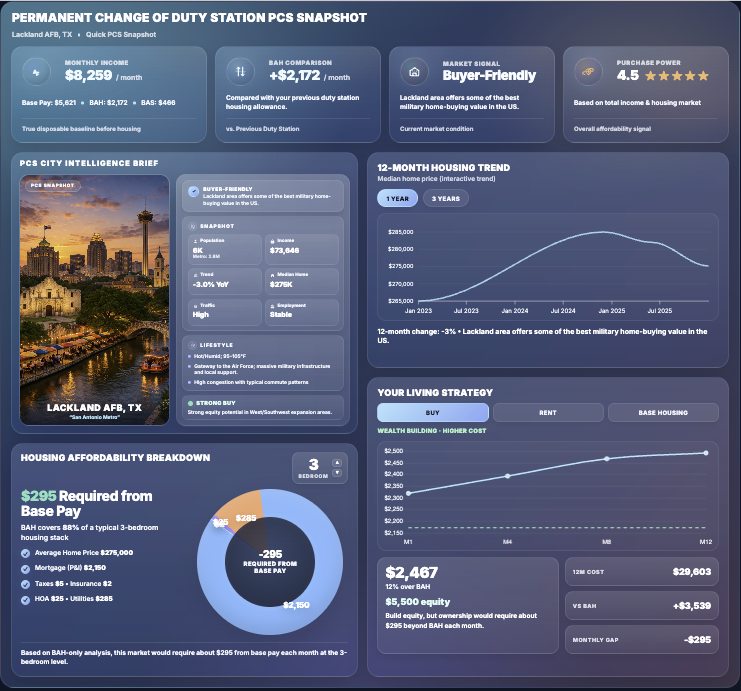
PCS Snapshot
01
Dashboard widget showing 29.7K ad spend sessions for this week with a wavy line graph.
PCS Snapshot
Base Demographics
02
living room with brown sofa and glass window
Base Demographics
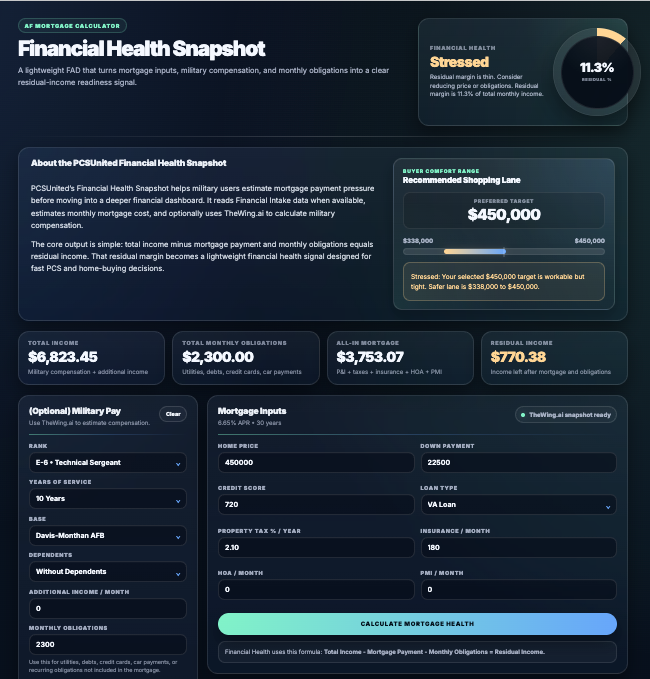
Military Mortgage Calculator
03
Air Force Mortgage calculator
Mortgage Calculator
Retirement & VA planning
04
Air Force Disability Rating Calculator.
Retirement & VA planning
Understand your results
05
a modern living room with a large window
Ask-Amy
Methodology questions

Frequently Asked Questions

Does Amy calculate my mortgage or military pay?
A.I model for TheWing.ai
The calculator code produces those results from inputs, tables, and defined formulas. Amy is instructed to explain the available results. AI explanations can still contain errors, so check the calculator output and cited official sources.
Are the interest rates and readiness scores official?
A.I model for TheWing.ai
No. The interest-rate bands, expense defaults, and readiness thresholds are TheWing planning assumptions. Military and VA tables have their own official sources, rate years, and eligibility rules.
Why do two tools show different grades?
A.I model for TheWing.ai
Published pages currently use different calculation and scoring versions. Check the income basis, housing costs, missing inputs, and whether a browser fallback was used. Compare scenarios within the same tool.
What if information or a service is unavailable?
A.I model for TheWing.ai
Some paths show missing inputs or warnings, reuse available results, or return a fallback summary. Other failures can stop the request. A partial result should not be read as a complete budget or a confirmed zero cost.
Does a strong score mean I should buy a home?
VA Disability Rating image
A strong score only means the entered scenario meets that model’s planning thresholds. It is not loan approval or a probability of repayment. Include your actual take-home pay, cash reserves, property costs, and personal plans before deciding.